Kleine smart schakelaar met energiemeting
De Shelly 1PM mini Gen 3 is ’s werelds kleinste Wi-Fi relais met ingebouwde power metering, je kunt apparaten tot 8 A aan- en uitschakelen en tegelijkertijd het energieverbruik monitoren.
API-componenten & Interfaces
Volgens de officiële documentatie (v. 1.0) ondersteunt de Shelly 1PM Mini Gen 3 de volgende componenten en protocollen:
- System
- Wi-Fi
- Bluetooth Low Energy
- Cloud
- MQTT
- Outbound Websocket
- Input (input:0)
- Switch (switch:0)
- Virtual Components
- BTHome components
- KNX integratie
- Matter (beschikbaar vanaf firmware 1.6.0-beta1)
- Tot 10 instances van Scripting (Script)
De API specificatie vind je op de website van Shelly.
Python script voor RPI5
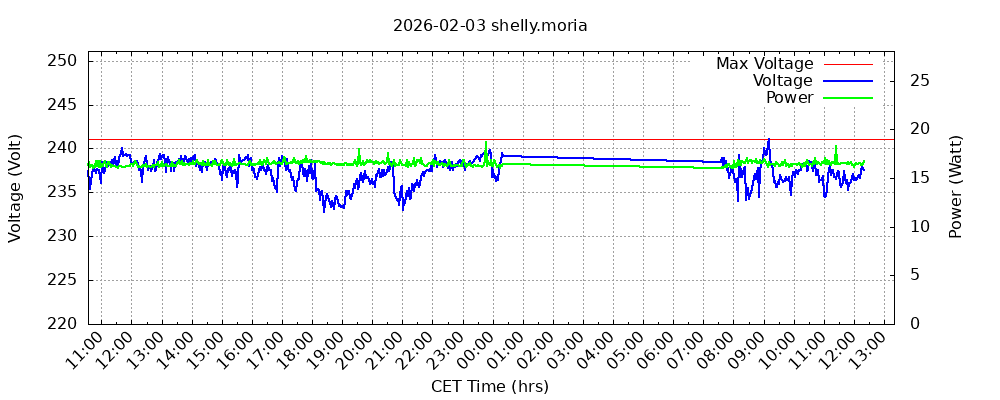
Ik heb een stuk Python code geschreven om spanning en stroom via API call uit de Shelly 1PM Mini Gen 3 op te halen en weg te schrijven in een file (powerdata.dat) en daaruit een grafiek (powerplotpi5.png) te genereren. In mijn opzet is de Shelly met Wifi verbonden op hetzelfde lokale netwerk als de Pi5 waarop het script draait. De Python code ziet er als volgt uit:
#!/usr/bin/env python3

import os
import subprocess
import requests

# === Configuration ===
SHELLY_IP = "10.x.x.x"
BASE_DIR = "/home/Shelly"

powerdata = os.path.join(BASE_DIR, "powerdata.dat")
plotfile = os.path.join(BASE_DIR, "powerplotpi5.png")

MAX_LINES = 1050
KEEP_LINES = 1000

# === Step 1: Manage file size ===
if os.path.exists(powerdata):
    with open(powerdata, "r") as f:
        lines = f.readlines()
    if len(lines) > MAX_LINES:
        with open(powerdata, "w") as f:
            f.writelines(lines[-KEEP_LINES:])

# === Step 2: Collect voltage and current data ===
try:
    resp = requests.get(f"http://{SHELLY_IP}/rpc/Switch.GetStatus?id=0", timeout=5)
    data = resp.json()
    voltage = data.get("voltage")
    current = data.get("current")
except Exception as e:
    voltage = None
    current = None

# Timestamp
timestamp = subprocess.getoutput("date +%Y-%m-%d,%H:%M:%S")

# Append combined line: timestamp, voltage, current
if voltage is not None and current is not None:
    with open(powerdata, "a") as f:
        f.write(f"{timestamp},{voltage},{current}\n")

# === Step 3: Compute max voltage and current in Python ===
V_max = I_max = 0
if os.path.exists(powerdata):
    with open(powerdata, "r") as f:
        for line in f:
            parts = line.strip().split(",")
            if len(parts) >= 4:
                try:
                    v = float(parts[2])
                    i = float(parts[3])
                    if v > V_max:
                        V_max = v
                    if i > I_max:
                        I_max = i
                except ValueError:
                    continue

# Ensure non-zero ranges to avoid gnuplot errors
if V_max == 0:
    V_max = 1
if I_max == 0:
    I_max = 0.1

# === Step 4: Generate dual-axis plot with gnuplot ===
gnuplot_script = f"""
set datafile separator ","
set xdata time
set timefmt "%Y-%m-%d,%H:%M:%S"
set format x "%H:%M"

curr_time_utc=time(0)
time_diff=2*60*60
curr_time_cet=curr_time_utc + time_diff

set terminal png size 1000, 400
set title '{subprocess.getoutput("date +%Y-%m-%d")} shelly.moria'

# Voltage Y-axis
set yrange [220:{V_max + 10}]
set ylabel 'Voltage (Volt)'
set ytics 5 nomirror

# Current Y2-axis
set y2range [0:{I_max*1.5}]
set y2tics nomirror
set y2label 'Current (Amp)'

set xlabel 'CET Time (hrs)'
set xrange [ curr_time_cet - 96400 : curr_time_cet ]
set grid xtics
set grid ytics
set xtics 3600 rotate by 45 right

set output '{plotfile}'

# Plot: max voltage line, voltage, and current on dual axis
plot \
     {V_max} w l lt 3 lc 'red' title 'Max Voltage', \
     '{powerdata}' using (strptime("%Y-%m-%d,%H:%M:%S", stringcolumn(1).",".stringcolumn(2))):3 with lines lc 'blue' lw 2 title 'Voltage', \
     '{powerdata}' using (strptime("%Y-%m-%d,%H:%M:%S", stringcolumn(1).",".stringcolumn(2))):4 axes x1y2 with lines lc 'green' lw 2 title 'Current'
"""

subprocess.run(["gnuplot"], input=gnuplot_script, text=True)
Resultaat is: